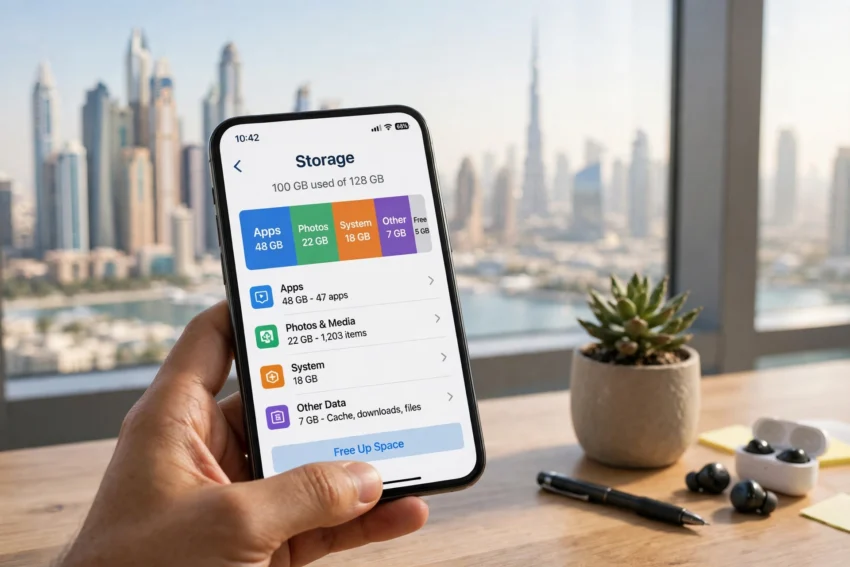
There is nothing more annoying than seeing a “Storage Almost Full” warning at the worst possible moment. You are at the Dubai Fountain trying to record a video, or you are about to download a boarding pass at Dubai International Airport, and your phone refuses to cooperate. If this sounds familiar, you are not alone. Phones in the UAE fill up fast, and it is rarely because of one big thing. It is the slow build-up of photos, videos, WhatsApp forwards, downloaded shows and apps you forgot you installed.
The good news is that you can usually recover several gigabytes in under half an hour, without deleting anything important and without buying a new phone. This guide walks you through the exact steps for both Android and iPhone, with tips that fit how people in the UAE actually use their phones.
Why Your Phone Runs Out of Storage So Fast in the UAE
Modern phones take beautiful photos, but those photos are large. A single minute of 4K video can use around 400 MB, and a weekend trip to Fujairah or a desert safari can easily produce several gigabytes of photos and clips. Add in the UAE’s fast mobile internet, and it becomes very easy to download films, music and offline maps without thinking twice.
Then there is WhatsApp. In the UAE, WhatsApp is the main way families and friends stay in touch, and group chats are constantly sharing photos, voice notes and videos. Every one of those files is saved on your phone by default. Over months, a few busy family groups can quietly take up more space than all your apps combined. The first step is finding out exactly what is using your space, so you can clean up with confidence instead of guessing.
Step 1: Find Out What Is Eating Your Storage
Before you delete anything, take two minutes to check where your storage has gone. Both Android and iPhone show you a clear breakdown.
On Android, open Settings, then tap Storage. You will see a colour-coded bar showing how much space is used by apps, photos and videos, audio and system files. On Samsung phones, the same information sits under Settings, then Battery and device care, then Storage. On iPhone, go to Settings, then General, then iPhone Storage. You will see a bar at the top and a list of apps below it, sorted from largest to smallest, with Apple’s own recommendations underneath.
This screen is your map. If photos and videos are the biggest category, start there. If one game or streaming app is taking up 5 GB, you know exactly where to look. Do not skip this step, because it stops you from deleting the wrong things.
Step 2: Clear the Cache and Temporary Files
Every app stores temporary files, called cache, so it can load faster next time. Over time, that cache grows. Clearing it is safe, because it only removes temporary data, not your accounts, chats or saved files.
On Android, go to Settings, then Apps, pick an app such as Chrome, YouTube or Instagram, tap Storage, and then tap Clear cache. Do this for your biggest apps and you can often recover a gigabyte or more. On iPhone, there is no single clear-cache button, but you can clear the cache inside individual apps. In Safari, go to Settings, then Safari, then Clear History and Website Data. For other apps, deleting and reinstalling the app clears its cache completely, and your account data is restored when you sign back in.
Streaming apps deserve special attention. Netflix, Shahid, Spotify and YouTube all let you download content for offline viewing, which is handy on the Dubai Metro or a long drive to Abu Dhabi, but those downloads sit on your phone until you remove them. Open each app, check its downloads section, and delete anything you have already watched or listened to.
Step 3: Deal With WhatsApp, the Biggest Storage Hog in the UAE
For most people in the UAE, WhatsApp is the single biggest cause of a full phone. The good news is that WhatsApp has a built-in tool that makes cleaning it up easy. Open WhatsApp, go to Settings, then Storage and data, then Manage storage. You will see how much space WhatsApp is using, a list of files larger than 5 MB, and your chats sorted by size. You can review and delete large videos and forwarded media in a few taps, while your chats and messages stay exactly where they are.
It is also worth changing your download settings. In the same Storage and data menu, set media to download only on Wi-Fi, or turn off auto-download for videos altogether. That way, you still receive everything your family sends, but your phone only saves what you choose to open. If you are travelling and relying on mobile data, this setting also helps you avoid surprise data use. And if your home Wi-Fi ever feels slow while you are backing things up, it may be worth comparing your plan, as we covered in our guide to the best internet plans in the UAE from Etisalat and du.
Step 4: Move Photos and Videos to the Cloud
Photos and videos are usually the largest category on any phone, and they are also the easiest to move. Cloud backup services copy your photos to the internet, then let you remove the originals from your phone safely.
Google Photos is the most popular option on Android, and it works on iPhone too. It gives you 15 GB of free storage, shared with your Google account, and its “Free up space” button removes photos from your phone only after confirming they are safely backed up. iPhone users can use iCloud Photos, which comes with 5 GB free and can be upgraded to a paid plan for a few dirhams a month. Microsoft OneDrive is another solid option, especially if you already use it for work documents.
The trick is to turn on backup only over Wi-Fi, so it does not eat your mobile data, and to let the backup finish before deleting anything. Once the backup is complete, use the app’s own free-up-space feature rather than deleting photos manually, because it checks that every photo is safely stored first. With the UAE’s fast home broadband and growing 5G coverage across the Emirates, a full photo backup usually finishes overnight while you sleep. Read more about 5G coverage in the UAE here.
Step 5: Delete Unused Apps and Games
Most of us carry apps we have not opened in months: a food delivery app from one order, a game a friend recommended, a banking app for an account we closed. Each one takes up space, and games are the worst offenders, with some popular titles using 2 GB or more.
Go through your app list with a simple rule. If you have not used an app in three months and you can download it again for free, remove it. On iPhone, you can use “Offload Unused Apps” under Settings, then General, then iPhone Storage. This removes the app itself but keeps its data, so if you reinstall it later, everything is just as you left it. On Android, long-press an app icon and tap Uninstall, or use the Google Play Store’s “Manage apps and device” screen, which sorts apps by size and by when you last used them.
Be careful with two things. Do not delete your banking, government or work apps just to save space, and check whether an app stores important files locally before removing it. UAE Pass, banking apps and work apps are small anyway, so the real savings come from games and shopping apps.
Step 6: Use Your Phone’s Built-In Cleanup Tools
Both Android and iPhone now include tools that do much of this work for you. On Android, the Google Files app has a “Clean” tab that finds junk files, duplicate photos, blurry shots, old screenshots and large files, and lets you delete them in one place. Samsung phones have a similar tool under Device care, and many other brands include their own storage cleaner.
On iPhone, the iPhone Storage screen gives personalised recommendations at the top, such as reviewing large attachments, offloading unused apps or removing old conversations. Follow those suggestions one by one. They are tailored to your phone, so they are often the fastest way to recover space.
Set yourself a reminder to run a quick cleanup once a month. Five minutes a month is enough to stop storage warnings from ever coming back, and it keeps your phone running faster too, because a nearly full phone struggles with updates and slows down when opening apps. If you enjoy making your phone work smarter, you may also like our guide to smart home devices in the UAE.
Extra Tips for UAE Users
A few UAE-specific habits make a real difference. If you use offline maps for driving around Dubai or Abu Dhabi, remember that downloaded maps take up space. Delete maps for areas you no longer visit and re-download them only when you need them. If you download films or music for flights from DXB or Abu Dhabi International, delete them as soon as you land.
Keep at least 10 percent of your storage free at all times, or around 5 to 10 GB on most modern phones. This gives your phone room to install software updates and run smoothly. If your phone is a 64 GB model and you are constantly fighting for space, it may be time to consider a 128 GB or 256 GB model when you upgrade. Storage is one of the few things you cannot add later, so it is worth paying a little more for it upfront.
Finally, remember that freeing up storage is also good digital hygiene. Old screenshots of boarding passes, IDs and one-time codes are not just taking up space, they are sensitive information sitting on your phone. Deleting them once you no longer need them is sensible in every way.
Frequently Asked Questions
Q: How much free storage should I keep on my phone?
A: Try to keep at least 10 percent of your total storage free, or roughly 5 to 10 GB on most phones. This gives your phone room for updates and keeps apps running smoothly.
Q: Is it safe to clear an app’s cache?
A: Yes. Clearing the cache only removes temporary files. Your account, chats, settings and saved files are not affected. You may need to sign back into an app in rare cases, but your data stays intact.
Q: If I delete WhatsApp photos, will I lose my chats?
A: No. Deleting media files removes only the photos and videos. Your text messages and chat history stay exactly as they are. You can also re-download media from a chat as long as it is still available on WhatsApp’s servers.
Q: What is the best free way to back up photos in the UAE?
A: Google Photos gives you 15 GB free and works on both Android and iPhone, which makes it the easiest free option for most people. iCloud gives iPhone users 5 GB free, and both services offer affordable paid plans if you need more space.
Q: Does a full phone actually slow it down?
A: Yes. When storage is nearly full, your phone struggles to install updates, save new files and manage memory, which can make apps open more slowly and the camera stutter. Freeing up space usually makes an older phone feel noticeably faster.
Conclusion
A full phone is a common problem in the UAE, but it is also one of the easiest to fix. Start by checking what is using your space, then clear your cache, tidy up WhatsApp, back up your photos to the cloud and remove the apps you no longer use. Most people recover several gigabytes in less than half an hour, and a monthly five-minute cleanup keeps the problem from coming back.
Your phone should work for you, not against you. With a little space to breathe, it will run faster, take the photos you want and stop interrupting you with warnings at the worst possible moments.
Disclaimer: This article is general information only. Storage sizes, app features and cloud plan prices can change, so check the latest details in your phone’s settings or on the provider’s official website before making changes.